Data Quality
Dalgo's data quality feature uses Elementary to monitor your dbt models and surface data issues automatically.
Elementary is a dbt observability package that runs alongside your transformations. Once set up, it shows test results, anomalies, and model run history across all your data models.
Accessing Data Quality
- Select Data in the left menu.
- Select the Quality tab.
What you see depends on your setup:
- If dbt is not configured — you'll see a message asking you to set up your Transform workspace first. Go to Transform to get started.
- If Elementary is not yet set up — you'll see a one-time setup prompt. Select Set up Elementary to add it to your dbt project.
- If Elementary is set up — the full report loads automatically.
Elementary setup
When you first enable Elementary, Dalgo installs and configures the package in your dbt project.

Reading the report
Once Elementary is running, the Data Quality page shows:
- Test results — pass/fail status for each dbt test across your models
- Model runs — when each model last ran and whether it succeeded
- Anomalies — automatically detected irregularities in row counts, freshness, or column values
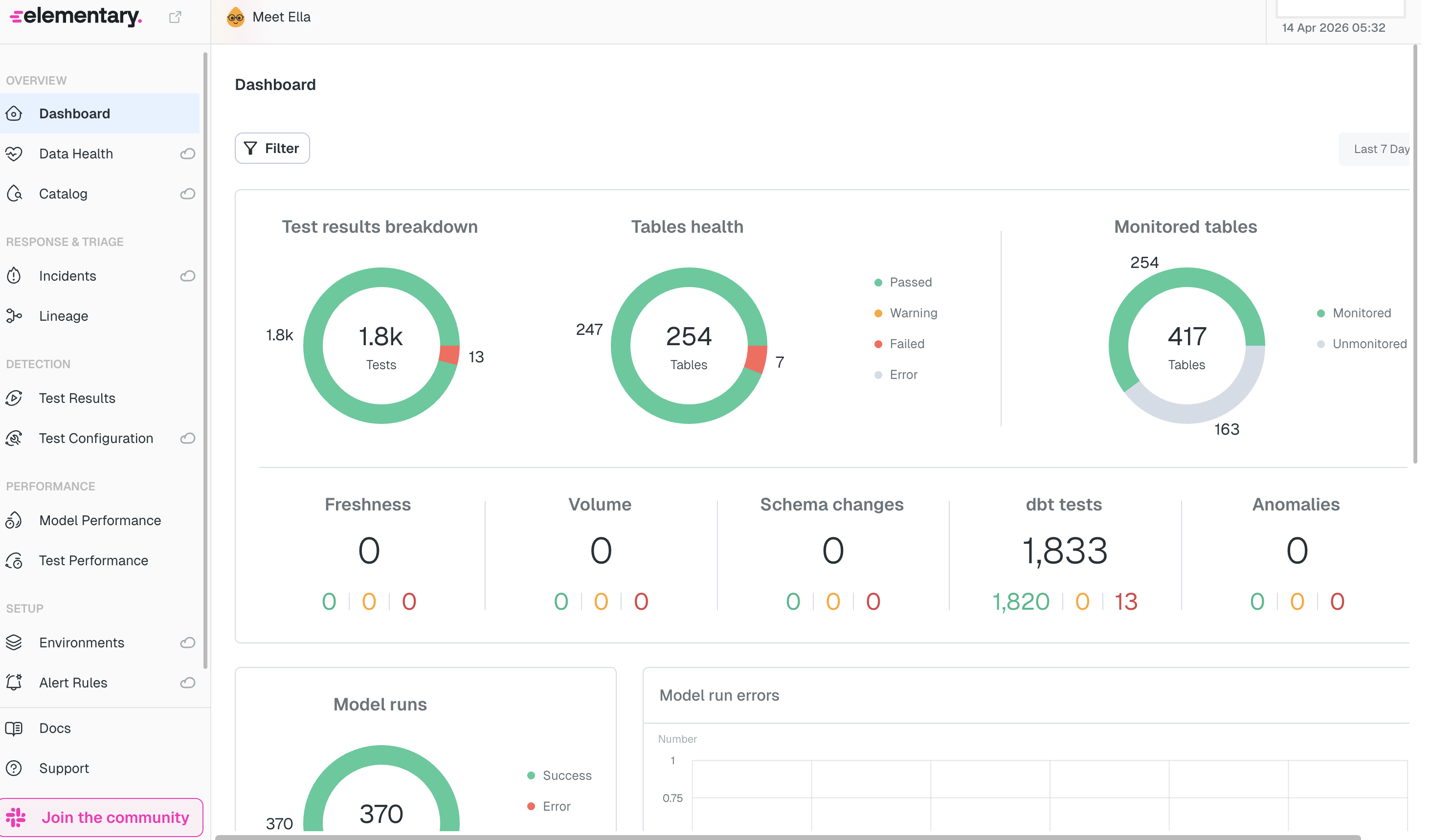
Results update each time your pipeline runs transformation tasks. If you haven't run a pipeline recently, the report may not show your latest data.
If you need help interpreting a failing check, contact your data team or support@dalgo.org.
Related: Transform · Orchestrate · Overview