Python and IDE setup
-
Set up an IDE(i.e. code editor) of your choice.
-
If you want to use an AI enabled editor, we recommend Cursor or Windsurf (see AI Assistants Section)
-
Another recommended IDE is Visual Studio Code 2 - https://code.visualstudio.com/download
-
Use the download link above to download and install the version for your ecosystem (linux/windows/macos)
-
We need python to run DBT. To check python version installation on your local machine, run the following command in the terminal: python3 --version
-
If you see a python version then you can proceed. But if not installed is shown then you need to install python first. Download & setup: https://www.python.org/downloads/
-
Mark the checkboxes as shown & click ‘Install Now’ (for easiest installation)
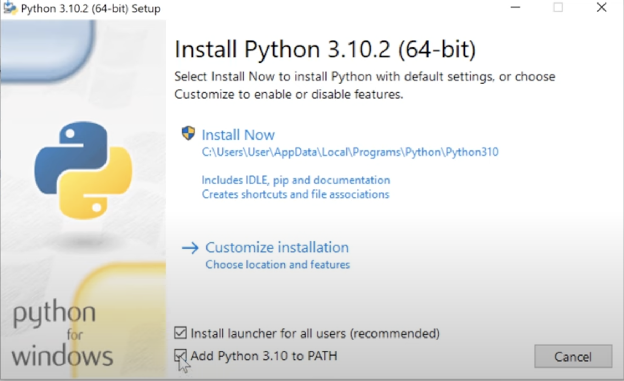
For detailed installation guide follow this tutorial: How To Install Python In 3 Minutes (For Beginners)